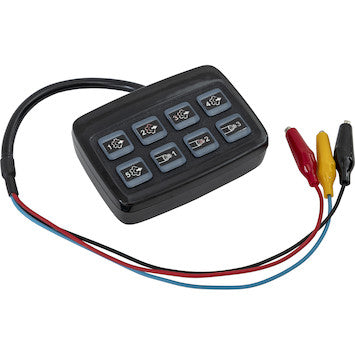
ProConnect™ Programmer: The Future of Warning Light Configuration
The ProConnect™ Programmer by Buyers Products is a revolutionary tool designed to eliminate the tedious, manual labor historically associated with configuring vehicle warning lights. By moving away from traditional "wiretapping" methods and toward a digital, software-driven interface, the ProConnect™ Programmer brings operational simplicity to the palm of your hand.
Whether you are a fleet manager standardizing a hundred vehicles or an independent installer looking to shave hours off your workflow, this device is the ultimate bridge between your laptop and your lighting hardware. Specifically engineered for the 8890929 and 8891829 series light heads, it transforms a complex electrical task into a seamless digital experience. In a market where time is money, the ProConnect™ represents the highest ROI tool in an upfitter's arsenal.
I. Core Functionality: Beyond Traditional Wiretapping
In the past, changing a flash pattern or adjusting the phase of an LED light head required "tapping" a specific wire (usually the yellow or white wire) to a ground or power source multiple times. This was not only time-consuming but prone to error—especially when trying to synchronize multiple lights across a large service body or plow truck. If you tapped one time too many, you had to cycle through all 20+ patterns again.
The ProConnect™ Programmer renders this method obsolete. By using the integrated wire function button on the programmer, you can activate and cycle through functions instantly. This digital handshake ensures that the light head receives a perfect signal every time, eliminating the risk of "arcing" or "misfiring" during the programming phase. This is particularly crucial for modern high-intensity LEDs which utilize sensitive microprocessors that can be damaged by inconsistent electrical pulses.
II. Connectivity and Software Integration
Modern problems require modern solutions. The ProConnect™ utilizes a universal USB-C plugin, ensuring high-speed data transfer and compatibility with almost any modern laptop or ruggedized field tablet.
The ProConnect™ Desktop Application
To begin, simply download the proprietary ProConnect™ application to your laptop. The interface is designed for clarity, removing the guesswork from pattern selection. Once connected via USB-C, the application automatically recognizes the programmer, allowing you to configure:
- Flash Patterns: Choose from dozens of SAE-compliant patterns, from rapid strobes to slow rotations, with a single click.
- Phase Alignment: Easily set lights to Phase 1 or Phase 2 to create alternating or simultaneous flash effects across your vehicle.
- Color Mode: For multi-color light heads, define which colors take priority or create custom split-color combinations that match your local jurisdictional requirements.
III. The Two Power Modes: Express vs. Save & Send
To accommodate different installer needs, the ProConnect™ Programmer features two distinct programming architectures. Understanding the technical nuances of these modes is key to maximizing shop efficiency.
"Express" Mode: The Real-Time Visualizer
Express mode is designed for real-time adjustments. As you change a setting in the software, the light head responds immediately. This provides instant visual feedback. It is ideal for:
- Visualizing how a specific pattern looks on the vehicle before finalizing the build.
- Testing the color temperature and intensity of the 8890929 or 8891829 series.
- Troubleshooting suspected hardware issues in a controlled bench-test environment.
"Save & Send" Mode: The Fleet Manager's Choice
Save & Send is the "Golden Standard" for professional upfitting. It allows you to build a complete configuration profile—selecting the pattern, phase, and color—and save it as a digital template. Once the profile is perfected, you can "Send" it to the light head in a matter of seconds. This allows you to program ten, twenty, or even fifty lights with the exact same settings, ensuring 100% fleet consistency without the risk of human error.
IV. Technical Theory: Pulse Width Modulation and Logic Signals
Under the hood, the ProConnect™ Programmer acts as a logic-level interface. Traditional lighting systems relied on simple 12V power interruptions. Modern Buyers Products light heads, however, utilize complex firmware. The ProConnect™ communicates via Pulse Width Modulation (PWM) signals to the internal controller of the 8890929 and 8891829 heads.
By using the programmer, you are bypassing the external power wires and speaking directly to the light's brain. This ensures that features like "Auto-Dim" or "Cruise Mode" (if supported) are configured with surgical precision. This digital method also prevents "Signal Noise," a common issue where electrical interference from the vehicle's alternator causes lights to jump out of sync.
V. Advanced Use Cases: The Multi-Color Sync Challenge
In multi-color lighting (Amber/Blue, Amber/White, etc.), the complexity of wiring grows exponentially. Traditionally, you would need to tap wires in specific sequences to tell the light which color should be dominant. With the ProConnect™ Programmer, the software interface provides a clear Color Matrix.
For example, if you are setting up a plow truck that needs Amber strobes for transport but White flood-mode for work areas, the ProConnect™ allows you to assign these modes to specific "Wire Functions" digitally. When the operator flips a switch in the cab, the light head performs exactly as programmed because the internal logic was set by the ProConnect™—not by a series of manual wire taps that might have been miscounted.
VI. The Impact on Shop Warranty & Liability
One of the hidden benefits of using the ProConnect™ Programmer is the reduction in warranty claims. Manual programming is often the culprit behind "Sync Drift," where lights that were supposed to be alternating eventually start flashing in unison. This usually happens because the manual tap didn't "take" perfectly on one of the heads.
By using the Save & Send mode, you create a digital record of the programming. If a customer returns with a lighting issue, you can simply plug the head back into the ProConnect™ to verify the internal settings. This level of diagnostics moves your shop from "guessing" to "knowing," significantly enhancing your professional reputation and reducing the time spent on "comebacks."
VII. Future-Proofing Your Fleet
As lighting regulations change (such as the shift toward "Slow-Flash" night modes in certain states), fleets are often forced to manually re-program every light on every truck. With the ProConnect™ Programmer, this task becomes a minor logistical hurdle rather than a month-long project. You simply update your saved profile in the app and "flash" the new settings onto the light heads during routine maintenance. This flexibility ensures that your fleet stays compliant with evolving safety standards without requiring a complete hardware overhaul.
VIII. Installation Time Analysis: A Comprehensive ROI Case Study
In a high-volume upfitting shop, time is the most expensive variable. Let’s look at the Return on Investment (ROI) for the ProConnect™ Programmer compared to manual labor.
| Metric | Manual Wiretapping | ProConnect™ Programmer |
|---|---|---|
| Time per Light Head | 5–8 Minutes | 15–30 Seconds |
| Accuracy Rate | 85% (Subject to human error) | 99.9% (Software Locked) |
| Fleet Consistency | Difficult to maintain | Automatic via Templates |
| Installer Fatigue | High (Repetitive tapping) | Low (Click-based interface) |
For a standard utility vehicle equipped with 10 light heads, the ProConnect™ saves approximately 60–75 minutes of labor per vehicle. At a standard shop rate of $120/hr, the programmer pays for itself after just two vehicle builds.
IX. Advanced Troubleshooting and Maintenance
To ensure your ProConnect™ Programmer remains operational for years, follow these maintenance protocols:
- Port Cleaning: Periodically use compressed air to clean the USB-C port. Dust buildup can interfere with the data-handshake between the laptop and the device.
- Firmware Updates: Buyers Products occasionally releases updates for the ProConnect™ app. These updates often include support for new flash patterns or improved compatibility with future light head models. Always check for updates before starting a large fleet project.
- Strain Relief: Avoid dangling the light head from the programmer's terminal. Use a flat surface to prevent stress on the internal circuitry of the programmer.
X. Frequently Asked Questions (The Master List)
Q: Does the ProConnect™ require an internet connection for every use?
A: No. Once the application is downloaded and installed, you can use the programmer in the field without an active internet connection. Internet is only required for initial download and firmware updates.
Q: Can I program lights that are already installed on a truck?
A: If you have access to the harness connector, yes. However, for the most efficient workflow, it is recommended to program the light heads on a bench before they are mounted and wired into the vehicle's permanent electrical system.
Q: Is there a limit to how many times a light head can be re-programmed?
A: No. The internal memory of the 8890929 and 8891829 series is designed for thousands of write cycles. You can update the configuration as often as your operational needs change.
XI. Summary: The New Industry Standard
The Buyers Products ProConnect™ Programmer is more than a convenience tool; it is a necessity for the modern upfitter. By centralizing the programming of 8890929 and 8891829 light heads into a single laptop application, it eliminates the risks of manual wiring, ensures fleet-wide consistency, and significantly reduces labor costs. As lighting technology continues to evolve, the ProConnect™ ensures you stay ahead of the curve with a professional, digital, and efficient workflow.
Key Takeaways:
• Dramatic reduction in installation time via the wire function button.
• High-fidelity synchronization of patterns and phases.
• Customizable memory buttons for specialized municipal or private contracts.
• Professional-grade USB-C connectivity for the modern mobile workforce.